-
EvalLM: Interactive Evaluation of Large Language Model Prompts on User-Defined CriteriaMachine Learning/MLLM 2024. 8. 17. 22:00
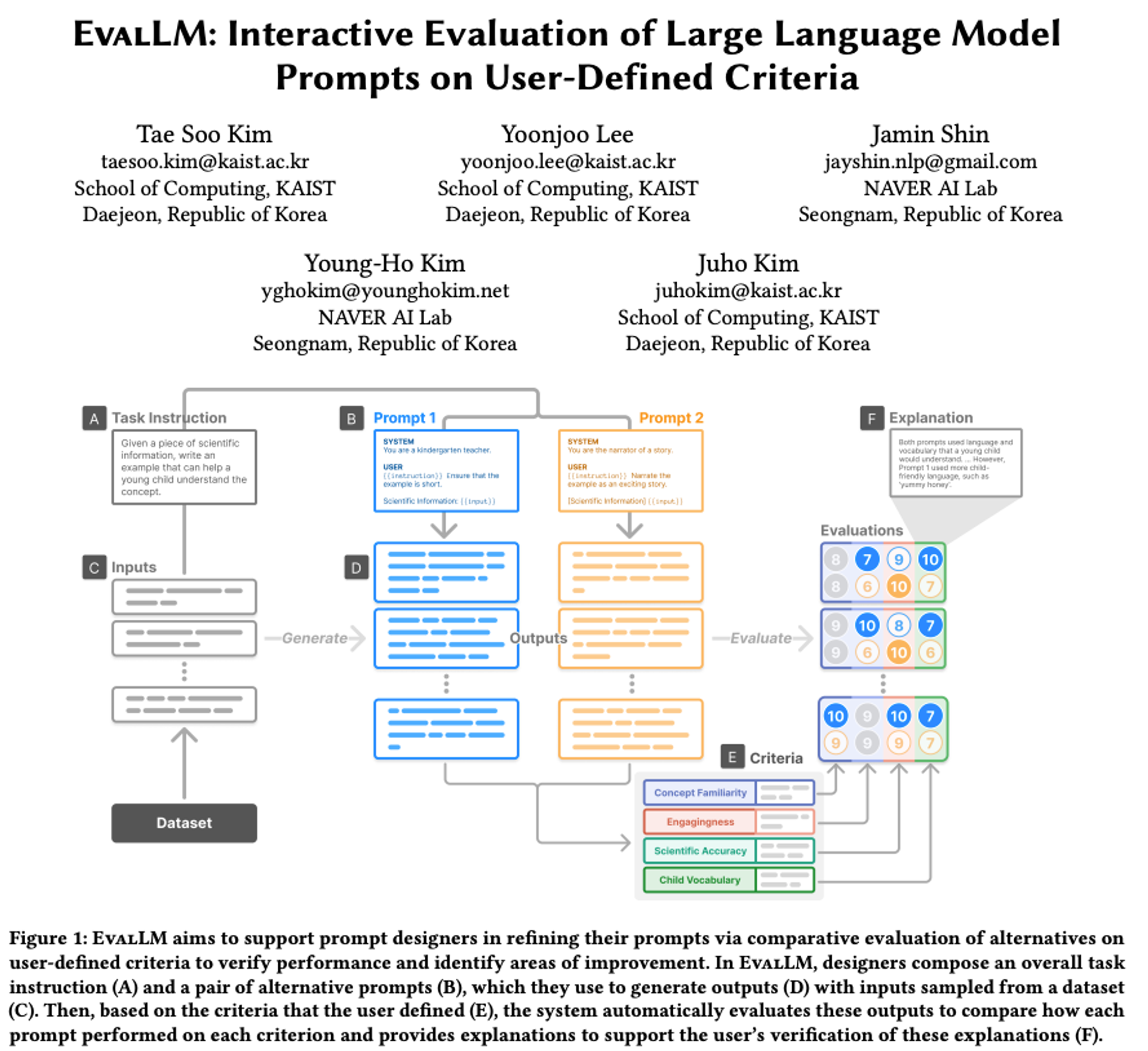
Abstract
- 프롬프트를 통해 LLM을 활용한 생성 애플리케이션을 프로토타입 할 수 있음
- 프로토타입을 실제 product로 발전시키기 위해서는 output을 평가하고 약점을 진단하여 프롬프트를 반복적으로 수정해야함
- EvalLM: interactive system
- 사용자가 정의한 기준에 따라 여러 출력을 평가하여 프롬프트를 개선함
Introduction
프롬프트 반복 수정의 필요성
- 프롬프트를 통해 AI 기반 어플리케이션을 쉽게 시작할 수 있음
- 고품질 출력을 위해 반복적인 프롬프트 수정 필요.
- 비결정적인 LLM 특성으로 작은 변경도 큰 영향.
- 개방형 생성 작업의 출력 평가 어려움.
- 자동 메트릭으로 주관적 품질 측정 불가.
- 초기 단계에서 빠른 반복 필요하지만 인간 평가자 필요.
Formative interviews
- 각 어플리케이션에 특화된 기준 존재
- 기준의 새로움과 annotatation 비용으로 인해 manual한 평가가 필요함
- manual하고 다면적인 평가는 큰 cognitive load 존재
- 프롬프트 수정이 품질에 미치는 영향을 확인하기 어려움
EvalLM
- 사용자 정의 기준에 따른 평가 지원
- 프롬프트의 고수준 개선에 집중
- LLM을 다음 두가지 역할로 사용
- evaluation assistant → 평가 결과를 설명하여 사용자가 부족한 부분을 파악하도록 도움
- criteria reviewer → 기준을 평가해 더 세분화된 평가가 가능한 수정 사항 식별
2. Related work
2.1 Designing LLM Prompts
- 만족스러운 프롬프트 설계는 어려움, 형식, 문구, 내용, 예시가 성능에 영향을 크게 미침
- 가능한 자연어 지시(intstruction)이 거의 무한하기 때문에, 가능한 많은 경우를 테스트 하는게 중요
- 이전의 접근 방식은 classifcation에 중점을 두었지만, open-ended generative task는 주관적인 기준에 따라 출력을 검사해야 하므로 더 복잡함
- 자동 테스트를 위한 다양한 시스템이 제안됨
- Ai Chain, PromptSource 등등
- 본 논문은 human-ai 협력 시스템을 통해 사용자가 주관적인 평가 기준을 정의하고, LLM이 기준에 따라 출력을 자동으로 평가하고 필요한 개선 사항을 제공
2.2 Natural Language Generation and Evaluation
- NLG는 평가가 어려움
- classifcation과 달리 여러 다른 출력이 동일하게 유효할 수 있음
- BLEU, ROUGE → NLG 출력을 평가하는 메트릭
- 유효 출력의 범위가 매우 넓은 경우에는 포괄적인 참초 셋 생성이 여러움
- Human Evaluation → 현재 표준, 생성된 텍스트를 사람이 평가
- LLM-simulated evaluators → LLM을 통해 annotator를 시뮬레이션 하여 자동으로 평가 진행
2.3 Interactive Machine Learning Evaluation
기계 학습에서의 상호작용 평가:
- 평가가 실세계 애플리케이션을 위한 기계 학습 모델 개발에 필수적.
- 단일 메트릭 성능 평가를 넘어서, 실무자들은 더 세분화된 모델 행동을 평가하여 결함과 개선 가능성을 식별.
- Zeno (Patel et al., 2020), What-If Tool (Wexler et al., 2019), Errudite (Wu et al., 2019): 실무자가 데이터의 슬라이스나 하위 집합을 식별하여 모델 실패를 드러낼 수 있도록 도움.
- Polyjuice와 AdaTest는 잠재적으로 도전적인 입력 데이터를 생성하여 모델의 행동을 테스트할 수 있게 함.
- Angler (Zhang et al., 2020): 모델 배포 후 문제 해결을 돕기 위해 온라인 및 오프라인 데이터를 결합하여 성능 문제 우선순위를 정함.
- Deblinder (Kim et al., 2021): 군중 작업자들로부터 모델 실패 보고서를 수집하고 분석할 수 있게 함.
- 우리의 연구는 LLM 기반 평가자의 도움으로 프롬프트 출력을 세분화된 기준으로 상호작용적으로 평가할 수 있게 하여 이러한 아이디어를 확장.
3. Formative Interviews
3.1 목적
- LLM 프롬프트 평가에서 현재의 practice와 challenge 이해
- 초기 개발 단계에서의 평가 방법과 평가가 프롬프트 refinement에 미치는 영향 조사
3.2 Findings
3.2.1 Evaluation is Manual
- 각 단계에서 샘플 입력으로 테스트 후 수작업으로 출력 평가
- 주관적이고, 맥락에 특화된 측면을 평가해야 하므로 manual한 평가가 필요함
- annoator를 모집하기도 어렵고 평가에 시간도 오래 걸림
3.2.2 Evaluation is Multi-Faceted (다면적)
- 복잡한 어플리케이션에 대한 단일 기준 평가가 불가
- 다양한 기준 및 요소를 동시에 고려해야하고, 평가가 더 어려움
- 일부는 중요한 기준에 집중하거나, binary 평가로 이를 단순화
3.2.3 Evaluation is Dynamic
- 프롬프트 반복 과정에서 기준이 확장되거나 변화함
- output을 검토하여 추가된 기준에 대해 평가, 평가 기준을 구체화 하는 과정이 어려움
3.2.4 Evaluation to Refinements
- 평가를 통해 output이 만족하지 못한 평가 기준을 확인하고 이를 개선하고자 시도
- 대부분의 디자이너는 프롬프트 수정 방법에 대한 확신이 없음
- 변경 사항을 테스트하고 다시 평가하는 방법 뿐 → 많은 노력이 필요하고, 수정 사항이 품질에 미치는 영향을 파악하기도 어려움
4. Design Goal
- 프롬프트 반복(Prompt iteration)을 지원하기 위해, 디자이너의 기준에 따른 Output 평가를 효율적으로 지원해야 함.
- 최근 연구에서 LLM이 다양한 주관적 기준(User-defined Criteria)에 따라 텍스트를 평가할 수 있음이 밝혀짐.
- 디자이너가 LLM을 평가 도구로 효과적으로 사용하기 위해서는 자신의 기준을 정의하고 이에 따른 평가가 기대에 부합하는지 확인해야 함.
- 이러한 상호 작용 프로세스를 지원하기 위해, 인터뷰에서 도출된 통찰을 LLM 기반 Prompt Iteration 및 평가 시스템의 디자인 목표로 정리.
- 심리 측정 척도 개발 과정에서 영감을 얻음 (예: NASA-TLX).
DG1: 생성된 Output을 사용자 정의 기준에 따라 자동으로 평가.
Automate evaluation of generated outputs according to user-defined criteria.
- 자동 평가 보조자는 출력물의 초기 평가를 제공하여 디자이너의 노력을 줄일 수 있음.
- 디자이너는 자신의 기준을 정의하여 보조자의 평가를 자신의 기대와 요구에 align할 수 있음
DG2: 설명을 통해 automatic evaluation 검토할 수 있도록 지원.
Facilitate inspection of automatic evaluations through explanations.
- 인지 인터뷰(Conginitve interviews)가 응답자에게 생각을 말하도록 하여 척도의 잘못된 질문을 드러내는 것처럼, 자동 평가자(Automatic Evaluator)는 평가를 설명하고 정당화하여 디자이너가 평가가 기대에 부합하는지 검토할 수 있도록 해야 함.
DG3: Output data와 이전 문헌(prior literature)을 기반으로 기준을 정의할 수 있도록 함.
Allow for the definition of criteria based on output data and prior literature.
- 인터뷰에서 밝혀진 바와 같이, 프롬프트 디자이너는 출력을 평가하고 이전 작업을 참조하여 새로운 기준을 구상함.
- 이는 심리 측정 척도 질문을 정의하는 귀납적 및 연역적 방법과 유사함.
DG4: 사용자 정의 기준을 검토하여 잠재적 수정 사항(Potential Revisions)을 식별.
Review the user-defined criteria to identify potential revisions.
- 척도가 외부 심사위원의 검토를 통해 수정되는 방식에서 영감을 받아, 시스템은 디자이너가 기준을 검토하여 잠재적 수정 사항을 식별할 수 있도록 지원해야 함.
- 이는 후속 평가의 효과를 높일 수 있음.

5. EvalLM
5-1. Interface
5-1-1. Generation Panel

→ used to test the propmpts
A. Task Instruction
B. two Propmpts (want to compare)
C. Sample inputs from dataset or manually
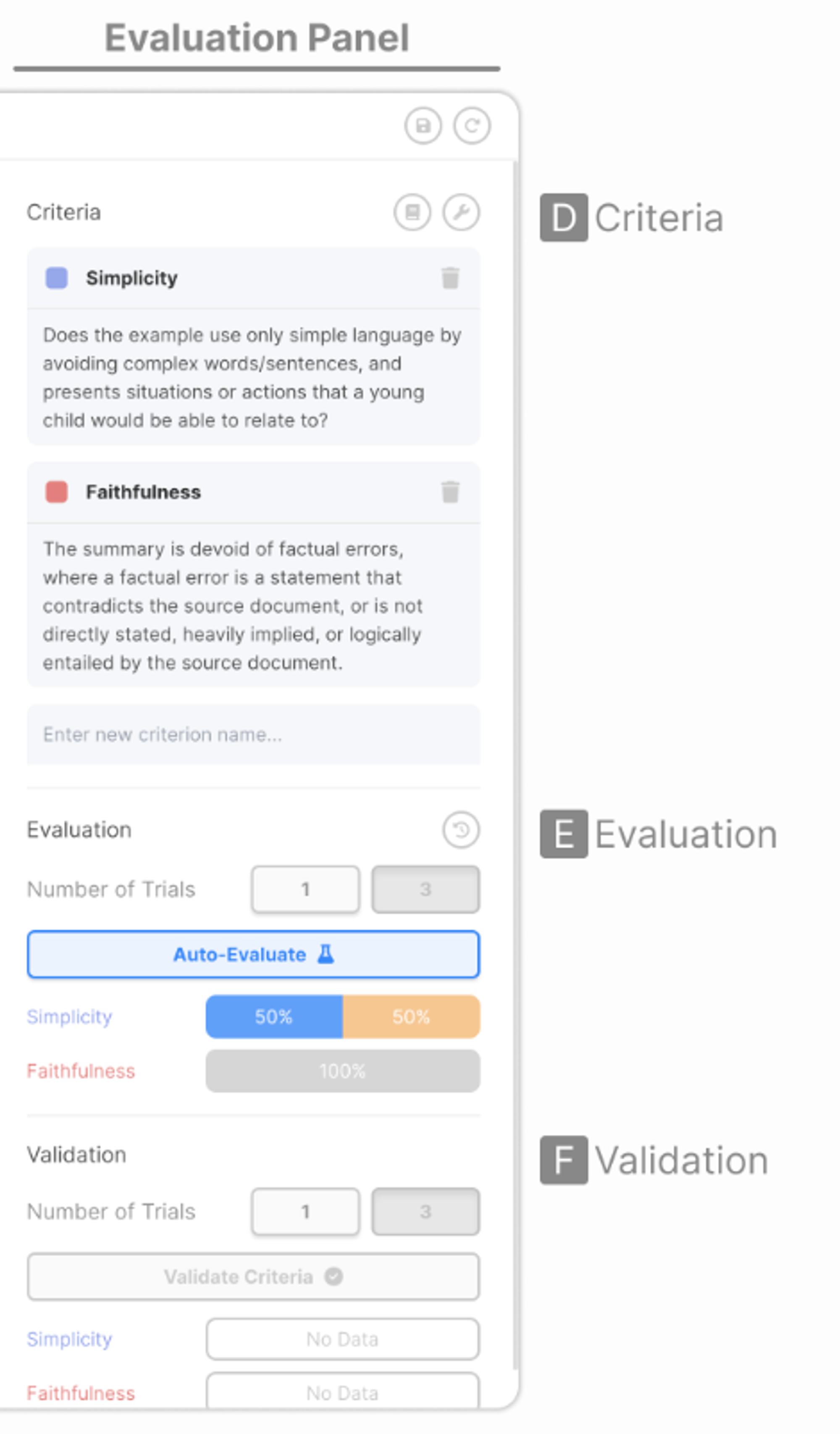
5-1-2. Evaluation Panel
D. set of evaluation criteria
E. Evaluation performance of each prompts
F. Validation → vaildate automatic evaluation & ground-truth evaluation
5-1-3. Data Panel
- inputs, outputs & evaluation Rsults
5-2. Criteria
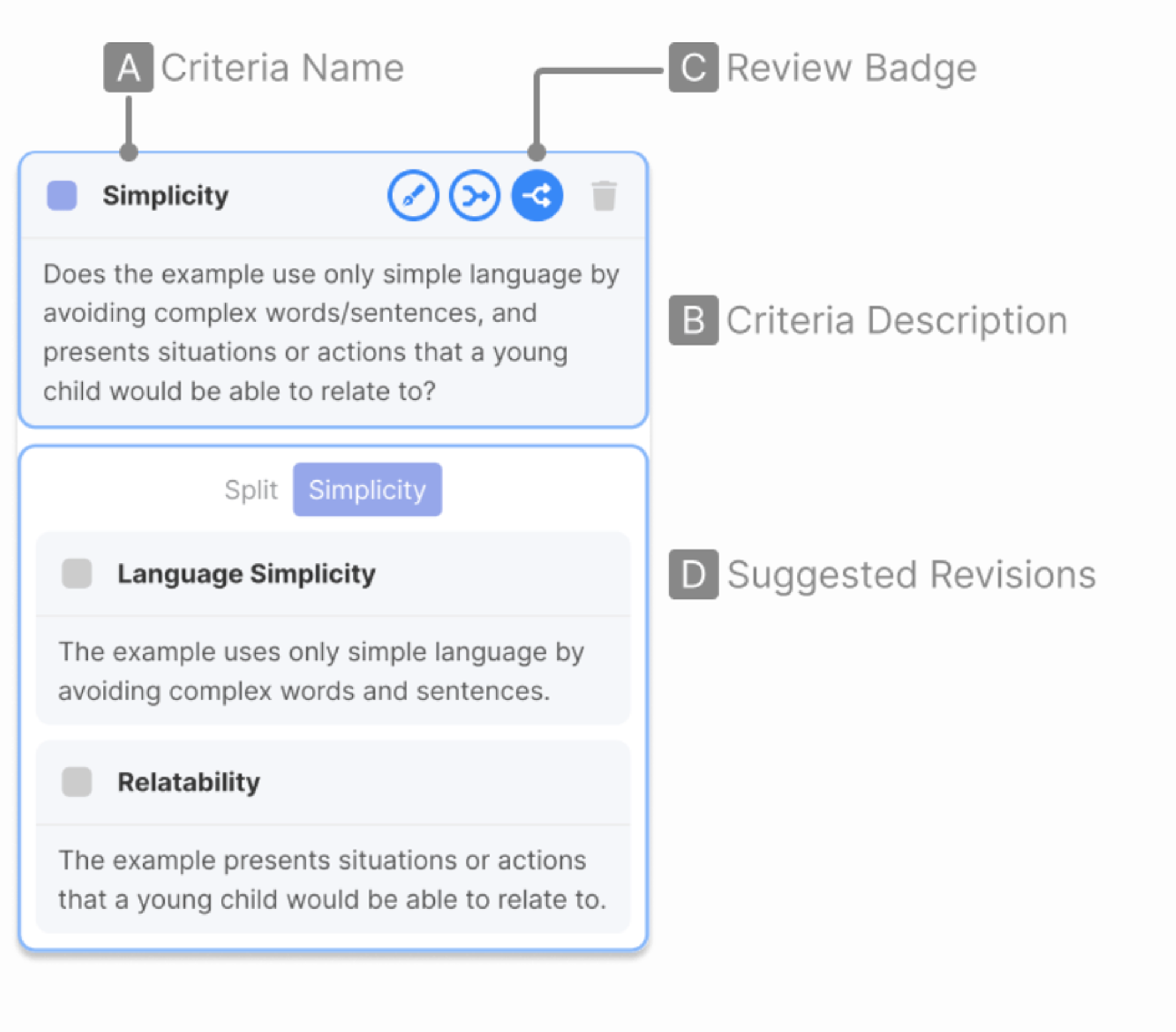
A. Name
B. Description
C. The system automatically reviews their criteria
- Refine / Merge / Split
D. Suggestions on how the criteria can be refined, merged and split
5-3. DataRow

A. Input
B. Outputs generated from each prompts
C. Evaluation Results
→ evaluation results show which prompt produced the output that better satisfied tha criteria
D. Assistant’s explanation
E. The system highlights spans that were considered to be important
F. Evaluation trials
Evaluation Prompts
Please give feedback on the responses for each criteria.
First, provide a comprehensive explanation comparing
the two assistants in their ability to satisfy
the criterion. You should justify your judgement
by providing substantial detail about your reasoning.
Ensure that you only write comments about one criterion
at a time. Avoid giving feedback on other aspects of
the responses that are not described in the criteria.
→ 2개의 결과에 대한 주어진 criteria를 기준으로 평가하고, 이에 대한 상세한 설명을 제공
Then, for each assistant, list a maximum of five words
or short phrases from their response that illustrate
what you described in your explanation. Avoid listing
whole sentences or long phrases as evidence. If the
whole response is needed as evidence, add the token
"$WHOLE$" to the list.
→ 각각의 결과에 대해 평가 결과에 대한 설명에 가장 부합하는 단어를 최대 다섯개 선택
Finally, write your scores for
each assistant on the criterion. The score should be
on a scale of 1 to 10, where a higher score indicates
that the assistant’s response was better at satisfying
the criterion. Avoid any potential bias and ensure
that the order in which the responses were presented
does not affect your judgement.
→ 기준에 대한 각 답에 점수 산정
Lastly, return a JSON object of the following format:
{"<criterion name>": {"explanation": <comprehensive
and detailed comparison of the assistants’ ability to
satisfy the criterion>, "assistant_1": {"evidence":
[<maximum of 5 words or short phrases from the
assistant’s response that serve as evidence for
your feedback>], "score": <score on the criterion>},
"assistant_2": {<same as assistant_1>}}, ...}
Emplementation
- All LLM components = OpenAPI API
'Machine Learning > MLLM' 카테고리의 다른 글
Human Feedback is not Gold Standard (0) 2024.11.28 FLASK: FINE-GRAINED LANGUAGE MODELEVALUATION BASED ON ALIGNMENT SKILL SETS (0) 2024.11.28 MLLM-as-a-Judge: Assessing Multimodal LLM-as-a-Judge with Vision-Language Benchmark (0) 2024.08.17 Video Recap: Recursive Captioning for Hour-Long Videos (0) 2024.08.17 Video Understanding Paper Summary (Data 중심) (0) 2024.08.17